
Introduction
In today’s digital world, people work with many different file formats every day. Whether you are a student, business professional, freelancer, or casual computer user, you have likely encountered situations where a file could not be opened because it was in an unsupported format. This is where a document converter utility becomes extremely useful.
A document converter utility is a software tool or online service that transforms one file format into another. For example, it can convert a Word document into a PDF, a PDF into a text file, or a presentation into an editable document format. These tools simplify file sharing, improve compatibility, and help users work efficiently across different devices and platforms.
As technology evolves, organizations and individuals exchange documents using various applications and operating systems. Without conversion tools, managing files can become frustrating and time-consuming. A reliable document converter utility ensures that information remains accessible and usable regardless of the original format.
This comprehensive guide explains everything beginners need to know about document converter utilities, including how they work, why they are important, their benefits and risks, common mistakes to avoid, and expert tips for achieving the best results. By the end of this guide, you will understand how to use document conversion tools confidently and effectively.
What is a Document Converter Utility?
A document converter utility is a specialized software application or online platform designed to change documents from one file format to another while preserving as much of the original content as possible. These tools support numerous document types, including PDF, DOCX, TXT, RTF, PPTX, XLSX, HTML, and many others.
The primary purpose of a document converter utility is to improve file compatibility. Different software programs use different file formats, making it difficult to open or edit documents across platforms. Conversion utilities bridge this gap by transforming files into formats supported by the target application.
Modern document converter utilities often include advanced features such as batch processing, OCR (Optical Character Recognition), cloud integration, compression, and security settings. These capabilities allow users to handle large volumes of files efficiently while maintaining document quality and accessibility.
Document conversion tools are available as desktop software, mobile applications, browser-based platforms, and enterprise solutions. Depending on the user’s needs, they can perform simple format changes or complex conversions involving formatting, images, tables, and embedded elements.
Why is a Document Converter Utility Important?
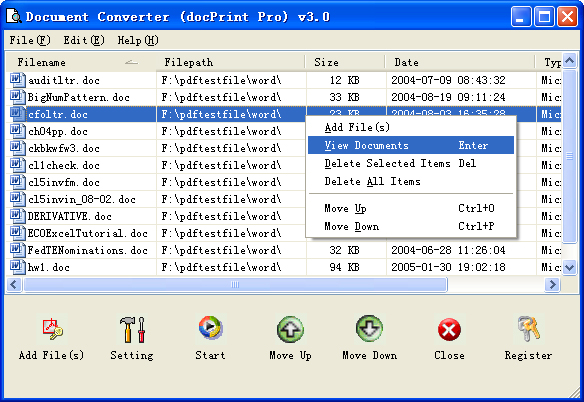
A document converter utility plays a vital role in modern digital workflows. Organizations, educational institutions, and individuals rely on multiple software platforms, making file compatibility essential for seamless communication and collaboration.
One of the biggest advantages of document conversion is accessibility. A document created in one application may not open correctly in another. Converting the file into a universally supported format ensures that recipients can view and use the information without technical difficulties.
Another important reason is productivity. Instead of recreating documents manually, users can quickly convert files and continue working without interruptions. This saves time, reduces effort, and minimizes the risk of errors that can occur during manual data entry.
Document converter utilities also help with archiving and sharing. Many users convert files to PDF format because PDFs preserve formatting and appear consistent across devices. Similarly, converting scanned documents into editable formats allows users to extract and modify information when needed.
As remote work and digital collaboration continue to grow, document conversion tools have become essential for maintaining efficient workflows and ensuring smooth communication between users operating in different environments.
Detailed Step-by-Step Guide
Step 1: Identify the Source File Format
Before converting a document, determine its current format. Common examples include DOCX, PDF, TXT, RTF, PPTX, and XLSX.
Understanding the source format helps you select the appropriate conversion method and tool.
Step 2: Choose the Desired Output Format
Decide which format you need after conversion. For example:
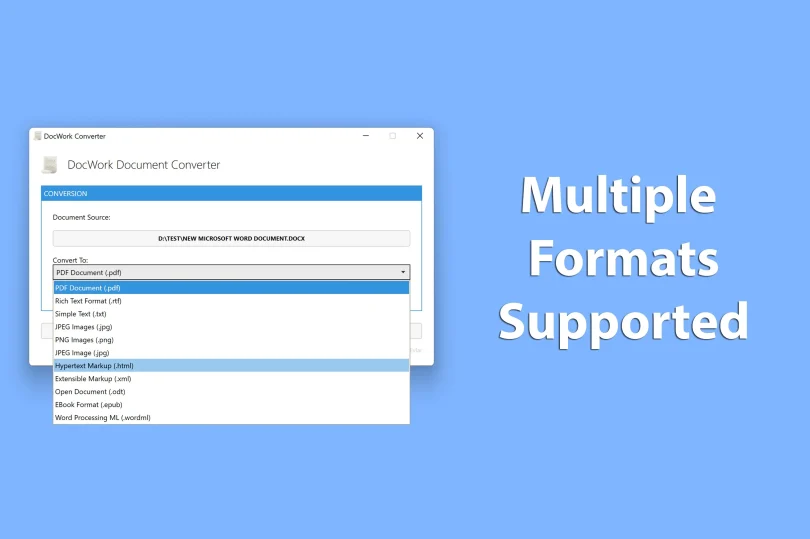
- Word to PDF
- PDF to Word
- PDF to Text
- Excel to PDF
- PowerPoint to PDF
- HTML to DOCX
Selecting the correct output format ensures the document serves its intended purpose.
Step 3: Select a Reliable Document Converter Utility
Choose a trusted conversion tool that supports both your source and target formats. Look for features such as:
- High conversion accuracy
- Secure file handling
- Batch processing
- Fast performance
- Format preservation
Reliable tools reduce the risk of formatting issues and data loss.
Step 4: Upload or Import the Document
Open the converter utility and upload the file you want to convert. Most tools support drag-and-drop functionality, making the process simple and convenient.
Ensure the file uploads successfully before proceeding to the next step.
Step 5: Configure Conversion Settings
Many document converter utilities allow users to customize settings such as:
- Page size
- Output quality
- Compression level
- OCR options
- Password protection
Adjust these settings according to your requirements.
Step 6: Start the Conversion Process
Click the convert button to begin processing the document.
The conversion time depends on factors such as file size, complexity, and the performance of the conversion tool.
Step 7: Review the Converted Document
After conversion is complete, open the new file and verify:
- Text formatting
- Images
- Tables
- Hyperlinks
- Page layouts
Checking the document ensures that the conversion was successful.
Step 8: Save and Share the File
Once you confirm the quality of the converted document, save it to your preferred location.
You can now share, print, edit, archive, or upload the file as needed.
Benefits of a Document Converter Utility
A document converter utility offers numerous advantages for personal and professional use:
- Improves file compatibility across devices and software
- Saves time by eliminating manual document recreation
- Simplifies document sharing
- Preserves important content and formatting
- Supports multiple file formats
- Enhances productivity and workflow efficiency
- Enables easy archiving of important files
- Reduces software dependency
- Supports batch conversion of multiple documents
- Allows conversion of scanned files through OCR technology
- Improves collaboration among teams
- Makes documents accessible to a wider audience
- Helps standardize document formats
- Provides quick access to editable content
- Reduces storage requirements through file optimization
Disadvantages / Risks
Although document converter utilities are useful, users should be aware of potential risks:
- Formatting inconsistencies after conversion
- Loss of complex design elements
- Potential data corruption during conversion
- Security concerns when using unknown online tools
- Limited support for certain proprietary formats
- Reduced image quality in some conversions
- Conversion failures with large files
- OCR errors in scanned documents
- File size increases in certain output formats
- Dependency on internet connectivity for online converters
- Potential privacy issues when uploading confidential documents
- Incompatibility between older and newer file versions
Common Mistakes to Avoid
Many users experience conversion problems due to avoidable mistakes.
One common mistake is selecting the wrong output format. Always ensure that the chosen format aligns with your intended use. For example, converting an editable document to PDF may not be suitable if further editing is required.
Another frequent error is using low-quality or untrusted conversion tools. Poor-quality converters may introduce formatting issues, data loss, or security vulnerabilities. Always choose reputable software or services.
Users also often skip reviewing the converted file. Even advanced tools can occasionally produce formatting inconsistencies. Checking the final document helps identify and correct issues before sharing or publishing it.
Ignoring file security is another significant mistake. Sensitive business documents should not be uploaded to unknown online platforms without verifying their privacy policies and security measures.
Finally, many users fail to maintain backup copies of original documents. Keeping the original file ensures that important data remains available if conversion errors occur.
FAQs
1. What does a document converter utility do?
A document converter utility changes files from one format to another while attempting to preserve the original content, formatting, and structure.
2. Can I convert PDF files into editable Word documents?
Yes. Many document converter utilities support PDF-to-Word conversion, allowing users to edit content that was previously locked within a PDF file.
3. Are online document converters safe?
Many reputable online converters are safe, but users should always review privacy policies and avoid uploading highly sensitive documents to unknown platforms.
4. What file formats can document converters support?
Most modern converters support formats such as PDF, DOCX, TXT, RTF, PPTX, XLSX, HTML, ODT, and many others.
5. Why does formatting sometimes change after conversion?
Formatting changes can occur because different file formats support different features. Complex layouts, fonts, and graphics may not transfer perfectly between formats.
6. What is OCR in document conversion?
OCR stands for Optical Character Recognition. It converts scanned images and printed text into editable digital text that can be searched and modified.
7. Can I convert multiple files at once?
Yes. Many advanced document converter utilities offer batch conversion features that allow users to process multiple files simultaneously.
8. Do document converters work on mobile devices?
Yes. Many document conversion tools are available as mobile applications or browser-based services compatible with smartphones and tablets.
Expert Tips & Bonus Points
Choosing the right document converter utility can significantly improve conversion quality and workflow efficiency. Always evaluate supported formats, conversion speed, security features, and user reviews before selecting a tool.
For important business documents, use desktop applications when possible because they often provide greater privacy and advanced conversion controls. Local processing minimizes exposure of sensitive data to third-party servers.
When converting scanned documents, select tools that include advanced OCR capabilities. High-quality OCR improves text recognition accuracy and reduces the need for manual corrections.
Keep software updated to ensure compatibility with modern file formats and security standards. Updated applications often provide better performance and improved conversion accuracy.
For large-scale projects, use batch conversion features to save time and maintain consistency across multiple files. Organizing source documents before conversion can further streamline the process.
Another valuable practice is testing conversions with sample files before processing large volumes of documents. This helps identify potential formatting issues and ensures that the selected settings produce satisfactory results.
Conclusion
Document converter utilities have become indispensable tools in today’s digital environment. As individuals and organizations increasingly rely on multiple software platforms and file formats, the need for efficient document conversion continues to grow. These utilities help bridge compatibility gaps, simplify file sharing, and improve overall productivity.
Whether you need to convert Word documents into PDFs, transform scanned files into editable text, or standardize documents for business use, a reliable document converter utility can save significant time and effort. Modern conversion tools offer advanced capabilities such as OCR, batch processing, security options, and cloud integration, making them suitable for a wide range of applications.
However, users should remain aware of potential risks, including formatting inconsistencies, security concerns, and compatibility limitations. By choosing trustworthy conversion tools, reviewing converted files carefully, and following best practices, users can minimize these issues and achieve high-quality results.
For beginners, understanding the basics of document conversion is an important step toward working more efficiently with digital files. As technology continues to evolve, document converter utilities will remain essential for ensuring seamless communication, accessibility, and collaboration across different platforms and devices. By mastering these tools, users can confidently manage documents and adapt to the ever-changing demands of the digital world.