
Introduction
In today’s digital world, documents are shared more than ever before, and one of the most common formats used globally is PDF. Whether you are a student, office worker, freelancer, or business owner, you often need to convert files into or from PDF format. This is where PDF Converter Tools become extremely useful. These tools help you transform Word documents, Excel sheets, images, and even web pages into professional PDF files within seconds. They also allow you to convert PDFs back into editable formats, making document management much easier.
PDF converter tools save time, improve productivity, and ensure your files remain secure and properly formatted across different devices. Instead of manually copying content or redesigning documents, you can rely on these tools to handle everything automatically. Many free and paid options are available online, offering features like batch conversion, compression, editing, and cloud integration.
For beginners, understanding how these tools work and how to use them correctly is essential. This guide will walk you through everything you need to know about PDF converter tools, including their importance, benefits, risks, step-by-step usage, and expert tips. By the end, you will be able to confidently choose and use the right PDF conversion method for your needs without any confusion.
What is PDF Converter Tools?
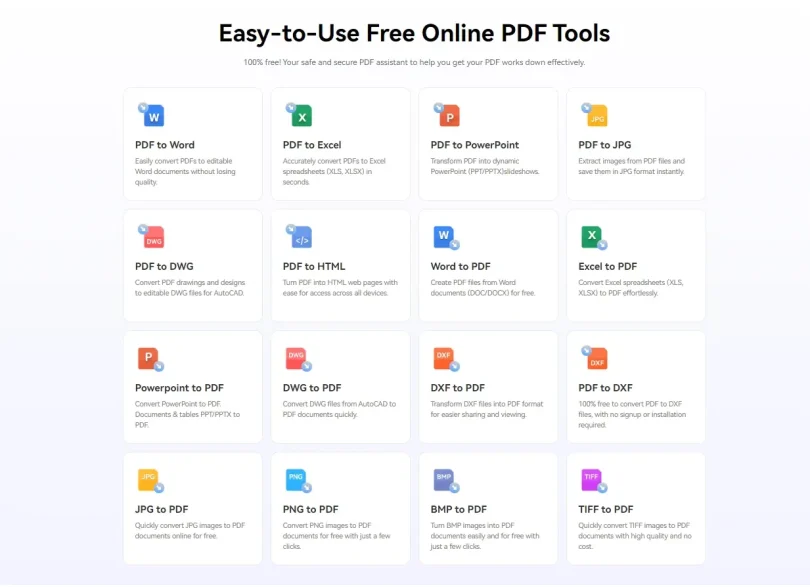
PDF converter tools are software applications or online platforms that allow users to change files from one format to another while maintaining layout, structure, and quality. The most common use is converting documents such as Word (DOC/DOCX), Excel (XLS/XLSX), PowerPoint (PPT), images (JPG/PNG), or text files into PDF format. They can also reverse the process by converting PDF files back into editable formats.
These tools work using built-in conversion engines that read the original file structure and recreate it in a new format. For example, when you convert a Word document into a PDF, the tool locks the formatting so it appears the same on all devices. Some advanced tools also include OCR (Optical Character Recognition), which allows scanned images or printed documents to be converted into editable text.
PDF converter tools are available in different forms, including online websites, desktop software, and mobile applications. Online tools are the most popular because they do not require installation and can be accessed from any device with an internet connection. Desktop applications, on the other hand, offer more advanced features and better security for sensitive files.
Overall, PDF converter tools are essential digital utilities that simplify document handling and improve workflow efficiency.
Why is PDF Converter Tools Important?
PDF converter tools play a crucial role in modern digital communication and document management. One of the main reasons they are important is compatibility. Different devices and software often display files differently, but PDFs ensure that your document looks the same everywhere.
Another important reason is convenience. Instead of manually retyping or redesigning documents, users can quickly convert files with a few clicks. This is especially helpful for students submitting assignments, businesses preparing reports, or freelancers sending client work.
Security is also a major factor. PDF files can be protected with passwords, encryption, and restricted editing options, making them ideal for sharing sensitive information. PDF converter tools help users create these secure files easily.
Additionally, these tools improve productivity. Batch conversion features allow multiple files to be processed at once, saving valuable time. Cloud-based tools also enable access from anywhere, making remote work more efficient.
In short, PDF converter tools are important because they simplify workflows, ensure consistency, improve security, and save time in both personal and professional environments.
Detailed Step-by-Step Guide to Using PDF Converter Tools
Step 1: Choose the Right PDF Converter Tool
The first step is selecting a reliable tool. You can choose between online platforms like small websites or professional desktop software. Beginners usually prefer online tools because they are easy to use and do not require installation.
Step 2: Upload Your File
Once you open the tool, you will see an upload button. Click it and select the file you want to convert. This could be a Word document, image, Excel sheet, or any supported format. Some tools also allow drag-and-drop uploading.
Step 3: Select Output Format
After uploading, choose the format you want to convert your file into. For example, if you want to convert Word to PDF, select PDF as the output format. If you are converting PDF to Word, select DOCX instead.
Step 4: Start Conversion Process
Click the convert button. The tool will process your file using its conversion engine. This usually takes a few seconds to a minute depending on file size and internet speed.
Step 5: Download Your Converted File
Once the conversion is complete, a download link will appear. Click it to save your new file to your device. Always check the file to ensure formatting is correct.
Step 6: Save or Share Your File
After downloading, you can save the file for future use or share it directly via email, cloud storage, or messaging apps. Many tools also offer direct sharing options.
Benefits of PDF Converter Tools
- Easy file conversion without technical skills
- Saves time compared to manual formatting
- Maintains original layout and design
- Supports multiple file formats
- Works on both mobile and desktop devices
- Many free tools available online
- Enables quick document sharing
- Improves productivity in work and study
- Supports batch processing for multiple files
- Enhances document compatibility across devices
Disadvantages / Risks of PDF Converter Tools
- Online tools may risk data privacy if files are sensitive
- Some free tools include watermarks
- Limited features in free versions
- Requires internet connection for online tools
- File size restrictions in many platforms
- Poor-quality converters may distort formatting
- Ads and pop-ups can affect user experience
- Desktop software may require installation and storage space
Common Mistakes to Avoid
Many beginners make mistakes when using PDF converter tools that can affect file quality and efficiency. One common mistake is using unreliable or unknown websites, which can lead to poor conversion results or data security issues. Always choose trusted platforms.
Another mistake is uploading large files without checking tool limitations. Many free converters have file size restrictions, which can cause errors during conversion.
Users also often forget to check output settings. Selecting the wrong format or compression level can reduce file quality. Always review settings before converting.
Some people ignore file preview after conversion. This can result in unnoticed formatting issues. Always open and review the final file before sharing it.
Lastly, avoid using too many online tools for sensitive documents. For confidential data, offline software is usually safer.
FAQs
1. What is a PDF converter tool used for?
A PDF converter tool is used to change files from one format to another, such as Word to PDF or PDF to Word, while keeping formatting intact.
2. Are PDF converter tools free?
Yes, many PDF converter tools are free online, but some advanced features may require paid versions.
3. Can I use PDF converters on my phone?
Yes, most modern PDF converter tools have mobile-friendly websites or apps for Android and iOS devices.
4. Is it safe to use online PDF converters?
It depends on the platform. Trusted websites are generally safe, but sensitive files should be handled with offline tools.
5. Do PDF converters affect file quality?
Good-quality converters maintain original formatting, but low-quality tools may distort layout or images.
6. What file formats can be converted to PDF?
Common formats include Word, Excel, PowerPoint, images, and text files.
7. Do I need internet for PDF conversion?
Online tools require internet, but desktop software can work offline.
Expert Tips & Bonus Points
Always choose a PDF converter that supports multiple file types for maximum flexibility. If you frequently work with documents, consider installing a desktop application for faster and more secure conversions. Use batch conversion features to save time when handling multiple files.
For better quality, avoid compressing files too much during conversion. If your work involves professional documents, always keep a backup of the original file before converting. Also, explore tools with OCR technology if you work with scanned documents, as this can greatly improve editing capabilities.
Another expert tip is to organize your files before conversion. Proper naming and folder structure help avoid confusion later. Lastly, regularly update your software or use updated online platforms to ensure better performance and security.
Conclusion
PDF converter tools have become an essential part of modern digital life. Whether you are a student, professional, or business user, these tools make document handling faster, easier, and more efficient. They eliminate the need for manual formatting and ensure that your files remain consistent across all devices.
By understanding how PDF converter tools work and how to use them correctly, you can significantly improve your productivity. From converting Word documents into polished PDFs to turning scanned images into editable text, the possibilities are endless.
However, it is also important to choose the right tool carefully, especially when dealing with sensitive information. Free online tools are great for everyday use, but professional or offline software may be better for confidential work.
In the end, mastering PDF converter tools gives you more control over your digital documents and helps you work smarter, not harder.