
Introduction
An online XPS converter is a web-based tool that allows users to convert XPS files into other popular formats such as PDF, DOCX, JPG, PNG, TXT, and more. These tools are designed to simplify file conversion without requiring software installation, making them a convenient choice for students, professionals, and everyday users.
XPS, which stands for XML Paper Specification, was developed by Microsoft as a document format similar to PDF. Although XPS files can preserve document layouts and formatting, they are not as widely supported as PDF files. As a result, many users need reliable online XPS converters to make their documents more accessible and compatible with different devices and applications.
The growing demand for digital document sharing has increased the popularity of online conversion tools. Whether you need to submit documents, archive files, print reports, or share content with others, converting XPS files can save time and eliminate compatibility issues. Most online converters offer simple drag-and-drop functionality, allowing users to upload files and receive converted versions within seconds.
This comprehensive guide explains everything beginners need to know about online XPS converters, including how they work, their benefits, potential risks, common mistakes, and expert recommendations for achieving the best conversion results.
What Is an Online XPS Converter?
An online XPS converter is a cloud-based application that transforms XPS documents into different file formats through a web browser. Users simply upload their XPS file, select the desired output format, and download the converted document after processing is complete.
Unlike desktop software, online converters operate entirely on remote servers. This means users do not need to install additional programs or worry about system compatibility. Most online XPS converters support multiple formats, making them useful for a wide range of personal and professional tasks.
These tools are commonly used when recipients cannot open XPS files or when users need to edit, share, print, or archive documents in a more universally accepted format. Because PDF remains the most widely supported document format, XPS-to-PDF conversion is one of the most popular uses of these tools.
Modern online XPS converters also include features such as batch conversion, file compression, cloud storage integration, and secure file deletion policies. These capabilities make them suitable for both occasional users and businesses handling large numbers of documents.
Why Is an Online XPS Converter Important?
XPS files are less common than PDF files, which often creates compatibility challenges. Many operating systems, mobile devices, and applications offer limited support for XPS documents. An online XPS converter solves this problem by transforming files into formats that are easier to access and share.
For businesses and professionals, document accessibility is essential. Sending an XPS file to a client who cannot open it may create delays and communication issues. By converting the file beforehand, users ensure that recipients can view and use the document without technical difficulties.
Online converters are also important because they eliminate the need for specialized software. Instead of purchasing expensive programs or installing additional applications, users can perform conversions instantly from any internet-connected device. This convenience saves time, reduces costs, and increases productivity.
Another major advantage is flexibility. Online XPS converters allow users to work across different operating systems, including Windows, macOS, Linux, Android, and iOS. This universal accessibility makes them valuable tools for modern digital workflows.
Detailed Step-by-Step Guide
Step 1: Choose a Reliable Online XPS Converter
Start by selecting a trustworthy online conversion tool. Look for platforms that offer secure connections, positive reviews, fast processing speeds, and support for multiple output formats.
A reliable converter should clearly explain its privacy policy and file handling practices. This is especially important when converting sensitive documents containing personal or business information.
Step 2: Prepare Your XPS File
Before uploading your document, review it carefully. Ensure the file opens correctly and contains all required content. If the document is damaged or corrupted, the conversion process may fail or produce inaccurate results.
Organizing your files beforehand can also help streamline the conversion process, particularly when handling multiple documents.
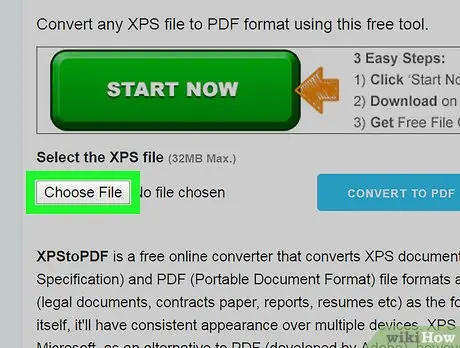
Step 3: Upload the XPS Document
Most online converters provide an upload button or drag-and-drop interface. Select your XPS file from your device and upload it to the platform.
Depending on file size and internet speed, the upload process may take a few seconds or several minutes. Larger files generally require more processing time.
Step 4: Select the Output Format
Choose the desired format for your converted document. Common options include:
- DOCX
- JPG
- PNG
- TXT
- HTML
- EPUB
Selecting the appropriate format depends on how you plan to use the document after conversion.
Step 5: Adjust Conversion Settings
Some advanced converters provide customization options. These may include:
- Image quality settings
- Page size adjustments
- Compression levels
- Text extraction options
- OCR functionality
Review these settings carefully to ensure the final output meets your requirements.
Step 6: Start the Conversion Process
After selecting the output format and settings, click the convert button. The online tool will process the file using its servers and generate the new document.
Processing time varies based on file size, server load, and conversion complexity.
Step 7: Download the Converted File
Once the conversion is complete, download the resulting file to your device. Verify that all content, formatting, images, and text have been preserved correctly.
Saving a backup copy is recommended, especially when working with important documents.
Step 8: Review and Test the Output
Open the converted file using appropriate software to ensure everything appears correctly. Check:
- Text formatting
- Images
- Tables
- Fonts
- Hyperlinks
- Page layouts
If issues are detected, try adjusting conversion settings and repeating the process.
Benefits of an Online XPS Converter
- No software installation required
- Accessible from any internet-connected device
- Fast and convenient conversion process
- Supports multiple output formats
- Ideal for beginners and non-technical users
- Saves storage space on local devices
- Often available free of charge
- Enables easy document sharing
- Improves file compatibility
- Supports remote work environments
- Useful for students and professionals
- Allows batch file processing on some platforms
- Reduces dependency on specialized software
- Provides cross-platform accessibility
- Helps preserve document formatting
Disadvantages / Risks
- Requires a stable internet connection
- Uploading sensitive files may raise privacy concerns
- Free tools may impose file size limits
- Some converters add watermarks
- Processing speed may vary during peak usage
- Formatting inconsistencies can occur
- Certain advanced features may require payment
- Temporary server outages can affect availability
- Poor-quality converters may reduce document accuracy
- Some websites may retain uploaded files longer than expected
Common Mistakes to Avoid
Many users assume all online XPS converters provide identical results. In reality, conversion quality varies significantly between platforms. Choosing a low-quality service may lead to formatting errors, missing images, or corrupted output files.
Another common mistake is ignoring security policies. Users frequently upload confidential documents without reviewing how files are stored or deleted. Always verify the converter’s privacy practices before uploading sensitive information.
Failing to review the converted document is another frequent issue. Even high-quality converters can occasionally introduce minor formatting changes. Checking the output ensures accuracy before sharing or printing the file.
Some users also select the wrong output format. For example, converting a document intended for editing into an image format may create unnecessary complications. Choosing the correct format from the beginning helps avoid additional work later.
Uploading damaged or incomplete XPS files can also cause conversion failures. Verifying file integrity before conversion improves success rates and reduces frustration.
FAQs
1. What is an XPS file?
An XPS file is a document format developed by Microsoft that preserves document layout, formatting, images, and text. It functions similarly to PDF but is less widely supported.
2. Why should I convert XPS files online?
Online conversion provides a fast and convenient way to make XPS documents compatible with more devices and applications without installing additional software.
3. Is an online XPS converter safe to use?
Most reputable converters are safe when they use secure encryption and clear privacy policies. However, users should avoid uploading highly confidential documents to unknown websites.
4. Can I convert XPS to PDF?
Yes. XPS-to-PDF conversion is one of the most common uses of online XPS converters because PDF files are widely supported across platforms.
5. Do online XPS converters cost money?
Many online converters offer free services with basic features. Some advanced tools charge fees for larger files, batch processing, or premium functionality.
6. Will formatting remain unchanged after conversion?
High-quality converters generally preserve formatting accurately. However, minor differences may occur depending on fonts, images, and document complexity.
7. Can I convert multiple XPS files at once?
Some online converters support batch conversion, allowing users to process multiple files simultaneously and save time.
8. Do online converters work on mobile devices?
Yes. Most modern online XPS converters function through mobile browsers and can be used on smartphones and tablets.
Expert Tips & Bonus Points
Choose converters that automatically delete uploaded files after processing to improve privacy and security. Reading the service’s data retention policy can help protect sensitive information.
For important business documents, perform a test conversion before processing large batches. This allows you to evaluate quality and identify potential formatting issues.
When converting image-heavy files, select the highest available quality settings. This helps preserve image clarity and document appearance.
Maintain backup copies of original XPS files before conversion. Having access to the original document makes it easier to repeat the process if necessary.
Use PDF as the preferred output format whenever document sharing is the primary goal. PDF files offer excellent compatibility across operating systems and devices.
If available, take advantage of OCR features when converting scanned documents. OCR technology can make text searchable and editable, significantly improving usability.
Regularly update your browser to ensure optimal compatibility with online conversion services. Modern browsers often provide better performance and security protections.
Conclusion
Online XPS converters have become essential tools for anyone working with XPS documents. Because XPS files are not universally supported, converting them into more common formats such as PDF, DOCX, JPG, or PNG improves accessibility and simplifies document sharing. These web-based tools provide a convenient solution without requiring software installation, making them ideal for beginners and experienced users alike.
The conversion process is generally straightforward. Users upload an XPS file, select an output format, and download the converted document within minutes. This simplicity, combined with support for multiple devices and operating systems, makes online XPS converters highly practical for both personal and professional use.
While these tools offer many advantages, users should remain aware of potential privacy and security concerns. Choosing reputable services, reviewing privacy policies, and checking converted files for accuracy are important steps in achieving reliable results.
By understanding how online XPS converters work and following best practices, users can efficiently transform documents into formats that meet their specific needs. Whether you are sharing reports, archiving records, editing content, or improving compatibility, an online XPS converter provides a fast, accessible, and effective solution for managing digital documents in today’s connected world.